Showing posts with label Error. Show all posts

Wednesday, December 13, 2017

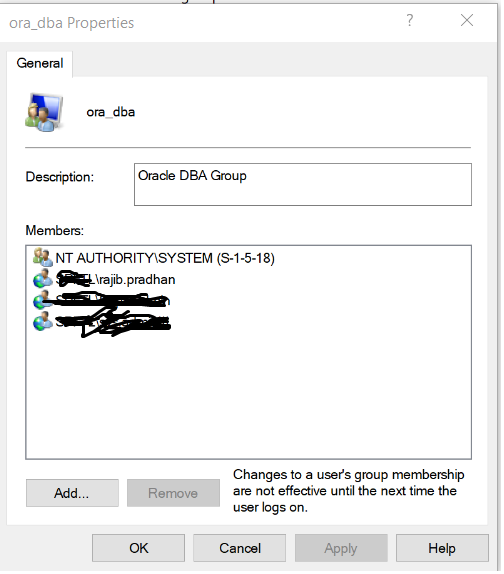
ora-01031 insufficient privileges windows

Cause: Your OS (Operating System) user is not a member of ora_dba Group.

Action: Make your operating system user as a member of ora_dba Group.

Operation: The following activity has to perform from Operating System Administrative user.

1. Open the command prompt (cmd) and write compmgmt.msc and hit Enter.


2. Select Group from Local user and Groups 

3. Right Click on ora_dba and Click Add Group to


4. Now Click Add ...


5. Now write your OS username in the box “Enter the object name to select” and click OK” 


Wednesday, October 11, 2017

ORA-00600: internal error code, arguments: [17285], [0x1109F69A0]

ORA-00600: internal error code, arguments: [17285], [0x1109F69A0], [1], [0x700000ED7586810], [], [], [], [], [], [], [], []
Use ADRCI or Support Workbench to package the incident.
See Note 411.1 at My Oracle Support for error and packaging details.
Wed Oct 11 16:37:11 2017
Sweep [inc][1123699]: completed

Cause: It was due to Bug 17984204.

Solution: Change the value of parameter _session_cached_instantiations set it to open_cursors+1 . Restart the instance. Note that this is not an official workaround so it may not work in some environments. 


SQL> show parameter open_cursors

NAME                                 TYPE        VALUE
------------------------------------ ----------- ------------------------------
open_cursors                         integer     6000

SQL> alter system set "_session_cached_instantiations"= 6001 scope=spfile;

System altered.


SQL>
SQL> shut immediate;
Database closed.
Database dismounted.
ORACLE instance shut down.
SQL> startup;
ORACLE instance started.

Total System Global Area 3.9272E+10 bytes
Fixed Size                  2593640 bytes
Variable Size            5100276888 bytes
Database Buffers         3.4158E+10 bytes
Redo Buffers               10874880 bytes
Database mounted.
Database opened.
SQL>
SQL> exit

Tuesday, September 26, 2017

ORA-00600: internal error code, arguments: [ktbdchk1: bad dscn]

Cause: This Errors May Occur after a switchover Physical Standby database, and it is due to Oracle Bug 8895202. 

Solution:  Apply the patch where this issue is fixed , Patch 8895202 or Patch Sets >= 11.2.0.2 or Patch Bundles >= 11.1.0.7. If Your database version is >=11.2.0.2 then just change the parameter _ktb_debug_flags to 8. There is no danger in keeping _ktb_debug_flags=8. It gets only activated by invalid scn in itl.

After change the parameter analyze the object which has been affected.

bash-4.3$ sqlplus "/as sysdba"

SQL*Plus: Release 11.2.0.4.0 Production on Tue Sep 26 14:31:11 2017

Copyright (c) 1982, 2013, Oracle.  All rights reserved.


Connected to:
Oracle Database 11g Enterprise Edition Release 11.2.0.4.0 - 64bit Production
With the Partitioning, Real Application Clusters, Automatic Storage Management, Oracle Label Security,
OLAP, Data Mining, Oracle Database Vault and Real Application Testing options

SQL> alter system set "_ktb_debug_flags"=8 scope=both sid='*';

System altered.

SQL> EXIT
Disconnected from Oracle Database 11g Enterprise Edition Release 11.2.0.4.0 - 64bit Production
With the Partitioning, Real Application Clusters, Automatic Storage Management, Oracle Label Security,
OLAP, Data Mining, Oracle Database Vault and Real Application Testing options
bash-4.3$
bash-4.3$


ORA-01555 caused by SQL statement below (SQL ID: 89w0nk4mvs89k, Query Duration=0 sec, SCN: 0x0b0e.183c53aa):

Dump continued from file: /u01/app/oracle/diag/rdbms/erpdcdb/erpdcdb1/trace/erpdcdb1_ora_7798850.trc
ORA-00600: internal error code, arguments: [ktbdchk1: bad dscn], [], [], [], [], [], [], [], [], [], [], []

========= Dump for incident 5041023 (ORA 600 [ktbdchk1: bad dscn]) ========
----- Beginning of Customized Incident Dump(s) -----
[ktbdchk] -- ktbgcl4 -- bad dscn
dependent scn: 0x0b0e.6ada21f5 recent scn: 0x0b0e.183bdd5c current scn: 0x0b0e.183bdd5c
----- End of Customized Incident Dump(s) -----

ANALYZE TABLE TABLE_NAME VALIDATE STRUCTURE CASCADE;

Dump continued from file: /u01/app/oracle/diag/rdbms/erpdcdb/erpdcdb2/trace/erpdcdb2_ora_5767956.trc
ORA-00600: internal error code, arguments: [2663], [2830], [698760342], [2830], [1792623805], [], [], [], [], [], [], []

========= Dump for incident 2720876 (ORA 600 [2663]) ========

*** 2017-09-26 13:52:19.908
dbkedDefDump(): Starting incident default dumps (flags=0x2, level=3, mask=0x0)
----- Current SQL Statement for this session (sql_id=2pbup9vshvk0u) -----
ANALYZE TABLE TABLE_NAME VALIDATE STRUCTURE CASCADE;

Sunday, September 24, 2017

ORA-12519: TNS:no appropriate service handler found

ORA-12519: TNS: no appropriate service handler found

Cause: Number of session and process reached the MAX_UTILIZATION level when listener find the current number of connections has reached maximum load it may set the state of the service handler for an instance to "blocked" and begin refusing incoming client connections.

Solution: Check the value of process parameter and increase the value of the parameter.


[grid@DB ~]$ lsnrctl services

LSNRCTL for Linux: Version 11.2.0.4.0 - Production on 24-SEP-2017 13:32:38

Copyright (c) 1991, 2013, Oracle.  All rights reserved.

Connecting to (DESCRIPTION=(ADDRESS=(PROTOCOL=IPC)(KEY=EXTPROC1521)))
Services Summary...
Service "+ASM" has 1 instance(s).
  Instance "+ASM", status READY, has 1 handler(s) for this service...
    Handler(s):
      "DEDICATED" established:1158 refused:0 state:ready
         LOCAL SERVER
Service "SPFTLDB" has 1 instance(s).
  Instance "SPFTLDB", status READY, has 1 handler(s) for this service...
    Handler(s):
      "DEDICATED" established:73880 refused:0 state:blocked
         LOCAL SERVER
Service "SPFTLDBXDB" has 1 instance(s).
  Instance "SPFTLDB", status READY, has 1 handler(s) for this service...
    Handler(s):
      "D000" established:0 refused:0 current:0 max:1022 state:ready
         DISPATCHER <machine: DB.spftl.com, pid: 18815>
         (ADDRESS=(PROTOCOL=tcp)(HOST=db.spftl.com)(PORT=43078))
The command completed successfully

SQL> show parameter processes

NAME                                 TYPE        VALUE
------------------------------------ ----------- ------------------------------
aq_tm_processes                      integer     1
db_writer_processes                  integer     3
gcs_server_processes                 integer     0
global_txn_processes                 integer     1
job_queue_processes                  integer     1000
log_archive_max_processes            integer     4
processes                            integer     150
SQL> ALTER SYSTEM SET processes=1000 SCOPE=SPFILE;

System altered.

SQL>

Bounce the database.

Wednesday, July 26, 2017

Hanging ALTER DATABASE RECOVER MANAGED STANDBY DATABASE CANCEL

Cause: Archive log are not applying into standby database but recovery process (MRP) are active, in this situation I decided to restart recovery process but whenever I am applying  ALTER DATABASE RECOVER MANAGED STANDBY DATABASE CANCEL, the command itself hanging situation.

Solution: Rather than bouncing the standby database just find and kill the MRP process and start the media recovery process.


SQL> ALTER DATABASE RECOVER MANAGED STANDBY DATABASE CANCEL;

Database altered.

SQL> ALTER DATABASE RECOVER MANAGED STANDBY DATABASE USING CURRENT LOGFILE DISCONNECT FROM SESSION;
ALTER DATABASE RECOVER MANAGED STANDBY DATABASE USING CURRENT LOGFILE DISCONNECT FROM SESSION
*
ERROR at line 1:
ORA-01153: an incompatible media recovery is active


SQL> ALTER DATABASE RECOVER MANAGED STANDBY DATABASE CANCEL;

Database altered.

SQL> ALTER DATABASE RECOVER MANAGED STANDBY DATABASE USING CURRENT LOGFILE DISCONNECT FROM SESSION;

Database altered.

SQL>

Log Details:

Archived Log entry 20997 added for thread 1 sequence 11504 ID 0xffffffffaec2031b dest 1:
Thu Jul 27 10:33:23 2017
ALTER DATABASE RECOVER MANAGED STANDBY DATABASE CANCEL
Thu Jul 27 10:45:35 2017
Managed Standby Recovery Canceled (erpdb)
Completed: ALTER DATABASE RECOVER MANAGED STANDBY DATABASE CANCEL
Thu Jul 27 10:46:23 2017
Recovery coordinator died, shutting down parallel recovery
Thu Jul 27 10:46:25 2017
RFS[516]: Selected log 13 for thread 1 sequence 11506 dbid -********** branch 928567359
Thu Jul 27 10:46:28 2017
Archived Log entry 20998 added for thread 1 sequence 11505 ID 0xffffffffaec2031b dest 1:
Thu Jul 27 10:46:41 2017
ALTER DATABASE RECOVER MANAGED STANDBY DATABASE USING CURRENT LOGFILE DISCONNECT FROM SESSION
ORA-1153 signalled during: ALTER DATABASE RECOVER MANAGED STANDBY DATABASE USING CURRENT LOGFILE DISCONNECT FROM SESSION...
Thu Jul 27 10:46:59 2017
ALTER DATABASE RECOVER MANAGED STANDBY DATABASE CANCEL
Thu Jul 27 10:47:24 2017
RFS[514]: Selected log 21 for thread 2 sequence 11340 dbid -********** branch 928567359
Thu Jul 27 10:47:27 2017
Archived Log entry 20999 added for thread 2 sequence 11339 ID 0xffffffffaec2031b dest 1:
Thu Jul 27 10:47:35 2017
Logmerger died, shutting down parallel recovery slaves
Recovery interrupted!
Thu Jul 27 10:47:37 2017
Managed Standby Recovery Canceled (erpdb)
Completed: ALTER DATABASE RECOVER MANAGED STANDBY DATABASE CANCEL
Thu Jul 27 10:48:08 2017
ALTER DATABASE RECOVER MANAGED STANDBY DATABASE USING CURRENT LOGFILE DISCONNECT FROM SESSION
Attempt to start background Managed Standby Recovery process (erpdb)
Thu Jul 27 10:48:08 2017
MRP0 started with pid=38, OS id=9764900
MRP0: Background Managed Standby Recovery process started (erpdb)
 started logmerger process
Thu Jul 27 10:48:14 2017
Managed Standby Recovery starting Real Time Apply
Parallel Media Recovery started with 32 slaves
Waiting for all non-current ORLs to be archived...
All non-current ORLs have been archived.
Completed: ALTER DATABASE RECOVER MANAGED STANDBY DATABASE USING CURRENT LOGFILE DISCONNECT FROM SESSION
Media Recovery Log +DG_FRA/erpdb/archivelog/2017_07_25/thread_2_seq_11299.1849.950272469
Media Recovery Log +DG_FRA/erpdb/archivelog/2017_07_25/thread_1_seq_11451.1854.950272385

Monday, June 5, 2017

MRP0: Background Media Recovery process shutdown

Errors with log +FRA/erpdrdb/archivelog/2017_06_02/thread_2_seq_9952.2503.945625685
MRP0: Background Media Recovery terminated with error 10485
Errors in file /u01/app/oracle/diag/rdbms/erpdrdb/erpdrdb/trace/erpdrdb_pr00_9109800.trc:
ORA-10485: Real-Time Query cannot be enabled while applying migration redo.
Recovery interrupted!
MRP0: Background Media Recovery process shutdown (erpdrdb)


Cause: After starting the database as upgrade mode you have to disconnect the recovery database.

Solution: Disconnect the recovery database, shutdown, startup and start the recovery process.

SQL> alter database recover managed standby database disconnect ;

Database altered.

SQL> shutdown immediate;
Database closed.
Database dismounted.
ORACLE instance shut down.
SQL> startup mount;
ORACLE instance started.

Total System Global Area 6.3069E+10 bytes
Fixed Size                  2393728 bytes
Variable Size            8388610432 bytes
Database Buffers         5.4660E+10 bytes
Redo Buffers               18116608 bytes
Database mounted.
SQL> alter database recover managed standby database using current logfile disconnect ;

Database altered.

SQL>

Tuesday, April 4, 2017

ORA-00245: control file backup failed; target is likely on a local file system

Cause: From 11gR2 onwards, the controlfile backup happens without holding the controlfile enqueue. For non-RAC database, this doesn't change anything. But for RAC database, due to the changes made to the controlfile backup mechanism in 11gR2, any instance in the cluster may write to the snapshot controlfile. Due to this snapshot controlfile need to be visible to all instances. 

Solution: The snapshot controlfile MUST be accessible by all nodes of a RAC database, if the snapshot controlfile does not reside on a shared device error will be raised at the time of RMAN backup while taking snapshot of controlfile. So placed controlfile into the Shared Disk.

RMAN-00571: ===========================================================
RMAN-00569: =============== ERROR MESSAGE STACK FOLLOWS ===============
RMAN-00571: ===========================================================

RMAN-03009: failure of backup command on CH3 channel at 04/05/2017 01:54:55
ORA-00245: control file backup failed; target is likely on a local file system

RMAN>

bash-4.3$ rman target/

Recovery Manager: Release 11.2.0.4.0 - Production on Wed Apr 5 11:32:13 2017

Copyright (c) 1982, 2011, Oracle and/or its affiliates.  All rights reserved.

connected to target database: ERPDB (DBID=2929713817)

RMAN> show snapshot controlfile name;

using target database control file instead of recovery catalog
RMAN configuration parameters for database with db_unique_name erpdb are:
CONFIGURE SNAPSHOT CONTROLFILE NAME TO '/u01/app/oracle/product/11.2.0/db_1/dbs/snapcf_erpdb1.f'; # default

RMAN> CONFIGURE SNAPSHOT CONTROLFILE NAME TO '+DG_DATA/erpdb/controlfile/snapcf_erpdb.f';

new RMAN configuration parameters:
CONFIGURE SNAPSHOT CONTROLFILE NAME TO '+DG_DATA/erpdb/controlfile/snapcf_erpdb.f';
new RMAN configuration parameters are successfully stored

RMAN> show snapshot controlfile name;

RMAN configuration parameters for database with db_unique_name erpdb are:
CONFIGURE SNAPSHOT CONTROLFILE NAME TO '+DG_DATA/erpdb/controlfile/snapcf_erpdb.f';

RMAN> exit


Recovery Manager complete.
bash-4.3$

Monday, March 20, 2017

ORA-00059: maximum number of DB_FILES exceeded

SQL>  sho parameter db_files

NAME                                 TYPE        VALUE
------------------------------------ ----------- ------------------------------
db_files                             integer     200
SQL> alter system set db_files = 1000 scope = spfile;

System altered.

SQL>
SQL> shut immediate;
Database closed.
Database dismounted.
ORACLE instance shut down.
SQL> startup;
ORACLE instance started.

Total System Global Area 1.9003E+10 bytes
Fixed Size                  2399752 bytes
Variable Size            2256536056 bytes
Database Buffers         1.6735E+10 bytes
Redo Buffers                9273344 bytes
Database mounted.
Database opened.
SQL> sho parameter db_files

NAME                                 TYPE        VALUE
------------------------------------ ----------- ------------------------------
db_files                             integer     1000

Thursday, January 19, 2017

ORA-01118: cannot add any more database files: limit of 125 exceeded

Cause : MAXDATAFILES parameter value of control file exceeded.

Solution: Create control file to trace and change the value of MAXDATAFILES parameter into new control file and start database using new control file.

ORA-00059: maximum number of DB_FILES exceeded


SQL> ALTER TABLESPACE DATA ADD DATAFILE '/oradata/erpdcdb/DATA12.dbf' SIZE 1024M AUTOEXTEND ON NEXT 100M MAXSIZE UNLIMITED;

ALTER TABLESPACE DATA ADD DATAFILE '/oradata/erpdcdb/DATA12.dbf' SIZE 1024M AUTOEXTEND ON NEXT 100M MAXSIZE UNLIMITED
*
ERROR at line 1:
ORA-01118: cannot add any more database files: limit of 125 exceeded


SQL> ALTER DATABASE BACKUP CONTROLFILE TO TRACE AS '/oradata/erpdcdb/CONTROL_FILE.SQL';

Database altered.

SQL> shut immediate;
Database closed.
Database dismounted.
ORACLE instance shut down.
SQL> STARTUP NOMOUNT
ORACLE instance started.

Total System Global Area 6.8564E+10 bytes
Fixed Size                  2382016 bytes
Variable Size            2.4478E+10 bytes
Database Buffers         4.4074E+10 bytes
Redo Buffers               10338304 bytes
SQL>

Now open the file and generate the scripts for control file and execute like below

SQL> CREATE CONTROLFILE REUSE DATABASE "erpdcdb" RESETLOGS FORCE LOGGING ARCHIVELOG
    MAXLOGFILES 16
  2    3      MAXLOGMEMBERS 3
  4      MAXDATAFILES 500
  5      MAXINSTANCES 8
  6      MAXLOGHISTORY 1168
  7  LOGFILE
  8    GROUP 1 (
  9      '/fra/erpdcdb/redo01a.log',
 10      '/oradata/erpdcdb/redo01b.log'
 11    ) SIZE 1024M BLOCKSIZE 512,
 12    GROUP 2 (
 13      '/fra/erpdcdb/redo02a.log',
 14      '/oradata/erpdcdb/redo02b.log'
 15    ) SIZE 1024M BLOCKSIZE 512,
 16    GROUP 3 (
 17      '/fra/erpdcdb/redo03a.log',
 18      '/oradata/erpdcdb/redo03b.log'
 19    ) SIZE 1024M BLOCKSIZE 512,
 20    GROUP 4 (
 21      '/oradata/erpdcdb/redo04b.log',
        '/fra/erpdcdb/redo04a.log'
 22   23    ) SIZE 1024M BLOCKSIZE 512,
 24    GROUP 5 (
 25      '/fra/erpdcdb/redo05a.log',
 26      '/oradata/erpdcdb/redo05b.log'
 27    ) SIZE 1024M BLOCKSIZE 512,
 28    GROUP 6 (
 29      '/fra/erpdcdb/redo06a.log',
 30      '/oradata/erpdcdb/redo06b.log'
 31    ) SIZE 1024M BLOCKSIZE 512
 32  DATAFILE
 33    '/oradata/erpdcdb/system01.dbf',
 34    '/oradata/erpdcdb/sysaux01.dbf',
 35    '/oradata/erpdcdb/undotbs01.dbf',
 36    '/oradata/erpdcdb/users01.dbf'
37  CHARACTER SET WE8MSWIN1252;

Control file created.

SQL> ALTER DATABASE OPEN RESETLOGS;

Database altered.

SQL> ALTER TABLESPACE TEMP ADD TEMPFILE '/oradata/erpdcdb/temp01.dbf'
     SIZE 32767M REUSE AUTOEXTEND ON NEXT 655360  MAXSIZE 32767M; 

Tablespace altered.

SQL>
SQL> shut immediate;
Database closed.
Database dismounted.
ORACLE instance shut down.
SQL> startup;
ORACLE instance started.

Total System Global Area 6.8564E+10 bytes
Fixed Size                  2382016 bytes
Variable Size            2.4478E+10 bytes
Database Buffers         4.4074E+10 bytes
Redo Buffers               10338304 bytes
Database mounted.
Database opened.
SQL> ALTER TABLESPACE DATA ADD DATAFILE '/oradata/erpdcdb/DATA12.dbf' SIZE 1024M AUTOEXTEND ON NEXT 100M MAXSIZE UNLIMITED;

Tablespace altered.

SQL>

ORA-26787: The row with key ... does not exist in table

Cause: The row to update or delete does not exist in the table of standby database.

Solution: Use DBMS_LOGSTDBY.INSTANTIATE_TABLE  procedure to bring a table back into sync with the version on the primary database.

1. Create public DB link in standby database with primary database.
2. Stop SQL Apply on the logical standby.
3. From DBA user Execute the DBMS_LOGSTDBY.INSTANTIATE_TABLE procedure to bring a table back into sync with the version on the primary database.
4. Start SQL Apply on the logical standby.

LOGSTDBY Apply process AS01 server id=1 pid=50 OS id=17029 stopped
Errors in file /u01/app/oracle/diag/rdbms/erpdrdb/erpdrdb/trace/erpdrdb_as01_17029.trc:
ORA-26787: The row with key ("BRANCHCODE", "HOUR", "MINUTES") = (423423, 4, 34) does not exist in table ERP_USER.TRAN_END_TIME
Errors in file /u01/app/oracle/diag/rdbms/erpdrdb/erpdrdb/trace/erpdrdb_lsp0_16993.trc:
ORA-26808: Apply process AS01 died unexpectedly.
ORA-26787: The row with key ("BRANCHCODE", "HOUR", "MINUTES") = (423423, 4, 34) does not exist in table ERP_USER.TRAN_END_TIME
LOGSTDBY Analyzer process AS00 server id=0 pid=49 OS id=17025 stopped
LOGSTDBY Apply process AS05 server id=5 pid=54 OS id=17037 stopped
LOGSTDBY Apply process AS04 server id=4 pid=53 OS id=17035 stopped
LOGSTDBY Apply process AS02 server id=2 pid=51 OS id=17031 stopped
LOGSTDBY Apply process AS03 server id=3 pid=52 OS id=17033 stopped
LOGMINER: session#=1 (Logical_Standby$), builder MS01 pid=46 OS id=17021 sid=139 stopped
LOGMINER: session#=1 (Logical_Standby$), preparer MS02 pid=47 OS id=17023 sid=203 stopped
LOGMINER: session#=1 (Logical_Standby$), reader MS00 pid=45 OS id=17019 sid=63 stopped

Solution: Perform the following in Standby Database.


SQL> alter database stop logical standby apply;

Database altered.

SQL> exec dbms_logstdby.instantiate_table('ERP_USER','TRAN_END_TIME','PRIMDB');

PL/SQL procedure successfully completed.

SQL> ALTER DATABASE START LOGICAL STANDBY APPLY IMMEDIATE;

Database altered.


SQL>

Tuesday, November 29, 2016

ORA-19527: physical standby redo log must be renamed

Cause : It was due to LOG_FILE_NAME_CONVERT parameter.

Solution: Set the value into this parameter.

[oracle@sbdbdr01 ~]$ sqlplus "/as sysdba"

SQL*Plus: Release 11.2.0.4.0 Production on Tue Nov 29 20:45:10 2016

Copyright (c) 1982, 2013, Oracle.  All rights reserved.

Connected to:
Oracle Database 11g Enterprise Edition Release 11.2.0.4.0 - 64bit Production
With the Partitioning, Automatic Storage Management, OLAP, Data Mining
and Real Application Testing options

SQL> ALTER DATABASE CLEAR LOGFILE GROUP 1;
ALTER DATABASE CLEAR LOGFILE GROUP 1
*
ERROR at line 1:
ORA-19527: physical standby redo log must be renamed
ORA-00312: online log 1 thread 1: '+DATA/dcdb/onlinelog/redo-01-01.log'


SQL> ALTER SYSTEM SET LOG_FILE_NAME_CONVERT='+DATA/dcdb/','+DATA/drdb/','+FRA/dcdb/','+FRA/drdb/' SCOPE= SPFILE;

System altered.

SQL> shut immediate;
Database closed.
Database dismounted.
ORACLE instance shut down.
SQL> startup nomount;
ORACLE instance started.

Total System Global Area 3958439936 bytes
Fixed Size                  2259320 bytes
Variable Size            2197816968 bytes
Database Buffers         1744830464 bytes
Redo Buffers               13533184 bytes
SQL> alter database mount standby database;

Database altered.

SQL> ALTER DATABASE CLEAR LOGFILE GROUP 1;

Database altered.

SQL>

Sunday, October 30, 2016

Warning: log write elapsed time 1288ms, size 78KB


This warning message will be generated only if the log write time is more than 500 ms. this is a storage performance issue, either the storage has to get faster, or the application has to commit less. So check the performance of storage and analyze the commit frequency of application.

erpdcdb02$ cat erpdcdb2_lgwr_5046526.trc
Trace file /u01/app/oracle/diag/rdbms/erpdcdb/erpdcdb2/trace/erpdcdb2_lgwr_5046526.trc
Oracle Database 11g Enterprise Edition Release 11.2.0.4.0 - 64bit Production
With the Partitioning, Real Application Clusters, Automatic Storage Management, Oracle Label Security,
OLAP, Data Mining, Oracle Database Vault and Real Application Testing option
ORACLE_HOME = /u01/app/oracle/product/11.2.0/db_1
System name:    AIX
Node name:      erpdcdb02
Release:        1
Version:        7
Machine:        00F8FB754C00
Instance name: erpdcdb2
Redo thread mounted by this instance: 2
Oracle process number: 23
Unix process pid: 5046526, image: oracle@erpdcdb02 (LGWR)


*** 2016-10-27 13:47:38.631
*** SESSION ID:(10811.1) 2016-10-27 13:47:38.631
*** CLIENT ID:() 2016-10-27 13:47:38.631
*** SERVICE NAME:(SYS$BACKGROUND) 2016-10-27 13:47:38.631
*** MODULE NAME:() 2016-10-27 13:47:38.631
*** ACTION NAME:() 2016-10-27 13:47:38.631

Warning: log write elapsed time 1288ms, size 78KB
kcrfw_update_adaptive_sync_mode: post->poll long#=20 sync#=49 sync=299 poll=10019 rw=416 ack=13 min_sleep=10019

*** 2016-10-28 06:50:44.380
Log file sync switching to polling
Current scheduling delay is 1 usec
Current approximate redo synch write rate is 16 per sec
kcrfw_update_adaptive_sync_mode: poll->post current_sched_delay=187 switch_sched_delay=1 current_sync_count_delta=0 switch_sync_count_delta=49

*** 2016-10-28 07:12:28.017
Log file sync switching to post/wait
Current approximate redo synch write rate is 0 per sec
kcrfw_update_adaptive_sync_mode: post->poll long#=6 sync#=16 sync=172 poll=10019 rw=779 ack=0 min_sleep=10019

*** 2016-10-29 01:39:22.838
Log file sync switching to polling
Current scheduling delay is 250 usec
Current approximate redo synch write rate is 5 per sec
kcrfw_update_adaptive_sync_mode: poll->post current_sched_delay=0 switch_sched_delay=250 current_sync_count_delta=0 switch_sync_count_delta=16

*** 2016-10-29 01:52:14.212
Log file sync switching to post/wait
Current approximate redo synch write rate is 0 per sec

Thursday, September 29, 2016

ORA-03113: end-of-file on communication channel (ORA-19809: limit exceeded for recovery files)

Cause: Archive log location are full.

SQL> startup;
ORACLE instance started.

Total System Global Area 2137886720 bytes
Fixed Size                  2177456 bytes
Variable Size            1342178896 bytes
Database Buffers          788529152 bytes
Redo Buffers                5001216 bytes
Database mounted.
ORA-03113: end-of-file on communication channel
Process ID: 3952
Session ID: 127 Serial number: 3


SQL>

From Alert Log

ARC0: STARTING ARCH PROCESSES COMPLETE
Errors in file d:\app\diag\rdbms\orcl\orcl\trace\orcl_ora_3952.trc:
ORA-16038: log 1 sequence# 1420 cannot be archived
ORA-19809: limit exceeded for recovery files
ORA-00312: online log 1 thread 1: 'D:\APP\ORADATA\ORCL\REDO_01.LOG'
USER (ospid: 3952): terminating the instance due to error 16038
Instance terminated by USER, pid = 3952


Solution:

SQL> conn /as sysdba
Connected to an idle instance.
SQL> startup mount;
ORACLE instance started.

Total System Global Area 2137886720 bytes
Fixed Size                  2177456 bytes
Variable Size            1342178896 bytes
Database Buffers          788529152 bytes
Redo Buffers                5001216 bytes
Database mounted.
SQL> ALTER SYSTEM SET DB_RECOVERY_FILE_DEST_SIZE=400G scope=both;

System altered.

SQL> alter database open;

Database altered.

SQL>

Tuesday, August 9, 2016

Oracle 11.2.0.4 Grid Installation Failed in Red Hat Linux 7.1 (ohasd failed to start)

I got this problem at the time of installation Oracle 11.2.0.4 grid in Red Hat Linux 7.1. I tryed several way to solve this problem but failed finally this problem has beed solved by the applying patch 18370031. This is bug for Oracle Clusterware 11g Release 2 (11.2.0.4.0). The following steps you have to perform to resolve this issue.

1. Deinstall previous GRID configuration.
2. Download and Apply the patch 18370031 using OPatch after orainstRoot.sh and  before executing root.sh scripts.
3. Execute root.sh scripts.

[root@spftldb02 app]# /home/grid/app/grid/product/11.2.4/grid/root.sh
Performing root user operation for Oracle 11g

The following environment variables are set as:
    ORACLE_OWNER= grid
    ORACLE_HOME=  /home/grid/app/grid/product/11.2.4/grid

Enter the full pathname of the local bin directory: [/usr/local/bin]:
   Copying dbhome to /usr/local/bin ...
   Copying oraenv to /usr/local/bin ...
   Copying coraenv to /usr/local/bin ...


Creating /etc/oratab file...
Entries will be added to the /etc/oratab file as needed by
Database Configuration Assistant when a database is created
Finished running generic part of root script.
Now product-specific root actions will be performed.
Using configuration parameter file: /home/grid/app/grid/product/11.2.4/grid/crs/install/crsconfig_params
Creating trace directory
LOCAL ADD MODE
Creating OCR keys for user 'grid', privgrp 'oinstall'..
Operation successful.
LOCAL ONLY MODE
Successfully accumulated necessary OCR keys.
Creating OCR keys for user 'root', privgrp 'root'..
Operation successful.
CRS-4664: Node spftldb02 successfully pinned.
Adding Clusterware entries to inittab
ohasd failed to start
Failed to start the Clusterware. Last 20 lines of the alert log follow:
2016-08-04 13:04:22.340:
[client(10083)]CRS-2101:The OLR was formatted using version 3.
2016-08-04 13:04:22.768:
[client(10110)]CRS-1001:The OCR was formatted using version 3.

ohasd failed to start at /home/grid/app/grid/product/11.2.4/grid/crs/install/roothas.pl line 377, <ALERTLOG> line 4.
/home/grid/app/grid/product/11.2.4/grid/perl/bin/perl -I/home/grid/app/grid/product/11.2.4/grid/perl/lib -I/home/grid/app/grid/product/11.2.4/grid/crs/install /home/grid/app/grid/product/11.2.4/grid/crs/install/roothas.pl execution failed

[grid@spftldb02 ~]$ cd /home/grid/app/grid/product/11.2.4/grid/deinstall
[grid@spftldb02 deinstall]$ ./deinstall
Checking for required files and bootstrapping ...
Please wait ...
Location of logs /tmp/deinstall2016-08-04_02-21-58PM/logs/

############ ORACLE DEINSTALL & DECONFIG TOOL START ############


######################### CHECK OPERATION START #########################
## [START] Install check configuration ##


Checking for existence of the Oracle home location /home/grid/app/grid/product/11.2.4/grid
Oracle Home type selected for deinstall is: Oracle Grid Infrastructure for a Standalone Server
Oracle Base selected for deinstall is: /home/grid/app/grid
Checking for existence of central inventory location /home/grid/app/oraInventory
Checking for existence of the Oracle Grid Infrastructure home /home/grid/app/grid/product/11.2.4/grid
Checking for sufficient temp space availability on node(s) : 'spftldb02.spftl.com'

## [END] Install check configuration ##

Traces log file: /tmp/deinstall2016-08-04_02-21-58PM/logs//crsdc.log

Network Configuration check config START

Network de-configuration trace file location: /tmp/deinstall2016-08-04_02-21-58PM/logs/netdc_check2016-08-04_02-22-10-PM.log

Network Configuration check config END

Asm Check Configuration START

ASM de-configuration trace file location: /tmp/deinstall2016-08-04_02-21-58PM/logs/asmcadc_check2016-08-04_02-22-10-PM.log

ASM configuration was not detected in this Oracle home. Was ASM configured in this Oracle home (y|n) [n]: n
ASM was not detected in the Oracle Home

######################### CHECK OPERATION END #########################


####################### CHECK OPERATION SUMMARY #######################
Oracle Grid Infrastructure Home is: /home/grid/app/grid/product/11.2.4/grid
The cluster node(s) on which the Oracle home deinstallation will be performed are:null
Oracle Home selected for deinstall is: /home/grid/app/grid/product/11.2.4/grid
Inventory Location where the Oracle home registered is: /home/grid/app/oraInventory
ASM was not detected in the Oracle Home
Do you want to continue (y - yes, n - no)? [n]: y
A log of this session will be written to: '/tmp/deinstall2016-08-04_02-21-58PM/logs/deinstall_deconfig2016-08-04_02-22-08-PM.out'
Any error messages from this session will be written to: '/tmp/deinstall2016-08-04_02-21-58PM/logs/deinstall_deconfig2016-08-04_02-22-08-PM.err'

######################## CLEAN OPERATION START ########################
ASM de-configuration trace file location: /tmp/deinstall2016-08-04_02-21-58PM/logs/asmcadc_clean2016-08-04_02-23-25-PM.log
ASM Clean Configuration END

Network Configuration clean config START

Network de-configuration trace file location: /tmp/deinstall2016-08-04_02-21-58PM/logs/netdc_clean2016-08-04_02-23-25-PM.log

De-configuring backup files...
Backup files de-configured successfully.

The network configuration has been cleaned up successfully.

Network Configuration clean config END


---------------------------------------->

Run the following command as the root user or the administrator on node "spftldb02".

/tmp/deinstall2016-08-04_02-21-58PM/perl/bin/perl -I/tmp/deinstall2016-08-04_02-21-58PM/perl/lib -I/tmp/deinstall2016-08-04_02-21-58PM/crs/install /tmp/deinstall2016-08-04_02-21-58PM/crs/install/roothas.pl -force  -deconfig -paramfile "/tmp/deinstall2016-08-04_02-21-58PM/response/deinstall_Ora11g_gridinfrahome1.rsp"

Press Enter after you finish running the above commands

<----------------------------------------

Setting the force flag to false
Setting the force flag to cleanup the Oracle Base
Oracle Universal Installer clean START

Detach Oracle home '/home/grid/app/grid/product/11.2.4/grid' from the central inventory on the local node : Done

Delete directory '/home/grid/app/grid/product/11.2.4/grid' on the local node : Done

Delete directory '/home/grid/app/oraInventory' on the local node : Done

Delete directory '/home/grid/app/grid' on the local node : Done

Oracle Universal Installer cleanup was successful.

Oracle Universal Installer clean END


## [START] Oracle install clean ##

Clean install operation removing temporary directory '/tmp/deinstall2016-08-04_02-21-58PM' on node 'spftldb02'

## [END] Oracle install clean ##


######################### CLEAN OPERATION END #########################


####################### CLEAN OPERATION SUMMARY #######################
Oracle Restart was already stopped and de-configured on node "spftldb02"
Oracle Restart is stopped and de-configured successfully.
Successfully detached Oracle home '/home/grid/app/grid/product/11.2.4/grid' from the central inventory on the local node.
Successfully deleted directory '/home/grid/app/grid/product/11.2.4/grid' on the local node.
Successfully deleted directory '/home/grid/app/oraInventory' on the local node.
Successfully deleted directory '/home/grid/app/grid' on the local node.
Oracle Universal Installer cleanup was successful.


Run 'rm -rf /etc/oraInst.loc' as root on node(s) 'spftldb02' at the end of the session.

Run 'rm -rf /opt/ORCLfmap' as root on node(s) 'spftldb02' at the end of the session.
Run 'rm -rf /etc/oratab' as root on node(s) 'spftldb02' at the end of the session.
Oracle deinstall tool successfully cleaned up temporary directories.
#######################################################################


############# ORACLE DEINSTALL & DECONFIG TOOL END #############

[grid@spftldb02 deinstall]$

[root@spftldb02 ~]# rm -rf /etc/oraInst.loc
[root@spftldb02 ~]# rm -rf /opt/ORCLfmap
[root@spftldb02 ~]# rm -rf /etc/oratab


[grid@spftldb02 OPatch]$ ./opatch napply -local /home/grid/app/grid/product/11.2.4/grid/18370031
Oracle Interim Patch Installer version 11.2.0.3.12
Copyright (c) 2016, Oracle Corporation.  All rights reserved.


Oracle Home       : /home/grid/app/grid/product/11.2.4/grid
Central Inventory : /home/grid/app/oraInventory
   from           : /home/grid/app/grid/product/11.2.4/grid/oraInst.loc
OPatch version    : 11.2.0.3.12
OUI version       : 11.2.0.4.0
Log file location : /home/grid/app/grid/product/11.2.4/grid/cfgtoollogs/opatch/opatch2016-08-04_14-41-51PM_1.log

Verifying environment and performing prerequisite checks...
OPatch continues with these patches:   18370031

Do you want to proceed? [y|n]
y
User Responded with: Y
All checks passed.
Provide your email address to be informed of security issues, install and
initiate Oracle Configuration Manager. Easier for you if you use your My
Oracle Support Email address/User Name.
Visit http://www.oracle.com/support/policies.html for details.
Email address/User Name:

You have not provided an email address for notification of security issues.
Do you wish to remain uninformed of security issues ([Y]es, [N]o) [N]:  Y


Please shutdown Oracle instances running out of this ORACLE_HOME on the local system.
(Oracle Home = '/home/grid/app/grid/product/11.2.4/grid')


Is the local system ready for patching? [y|n]
y
User Responded with: Y
Backing up files...
Applying interim patch '18370031' to OH '/home/grid/app/grid/product/11.2.4/grid'

Patching component oracle.crs, 11.2.0.4.0...
Patch 18370031 successfully applied.
Log file location: /home/grid/app/grid/product/11.2.4/grid/cfgtoollogs/opatch/opatch2016-08-04_14-41-51PM_1.log

OPatch succeeded.
[grid@spftldb02 OPatch]$
[grid@spftldb02 OPatch]$


[root@spftldb02 ~]# /home/grid/app/grid/product/11.2.4/grid/root.sh
Performing root user operation for Oracle 11g

The following environment variables are set as:
    ORACLE_OWNER= grid
    ORACLE_HOME=  /home/grid/app/grid/product/11.2.4/grid

Enter the full pathname of the local bin directory: [/usr/local/bin]:
The contents of "dbhome" have not changed. No need to overwrite.
The contents of "oraenv" have not changed. No need to overwrite.
The contents of "coraenv" have not changed. No need to overwrite.


Creating /etc/oratab file...
Entries will be added to the /etc/oratab file as needed by
Database Configuration Assistant when a database is created
Finished running generic part of root script.
Now product-specific root actions will be performed.
Using configuration parameter file: /home/grid/app/grid/product/11.2.4/grid/crs/install/crsconfig_params
Creating trace directory
LOCAL ADD MODE
Creating OCR keys for user 'grid', privgrp 'oinstall'..
Operation successful.
LOCAL ONLY MODE
Successfully accumulated necessary OCR keys.
Creating OCR keys for user 'root', privgrp 'root'..
Operation successful.
CRS-4664: Node spftldb02 successfully pinned.
Adding Clusterware entries to oracle-ohasd.service

spftldb02     2016/08/04 14:43:37     /home/grid/app/grid/product/11.2.4/grid/cdata/spftldb02/backup_20160804_144337.olr
Successfully configured Oracle Grid Infrastructure for a Standalone Server
[root@spftldb02 ~]#

Saturday, May 21, 2016

ORA-01624: log file needed for crash recovery of instance

Cause: The logfile group 2 contain committed data which are not written into data file because of checkpoint not completed.

Solution: Perform the manual checkpoint using ALTER SYSTEM CHECKPOINT GLOBAL command and drop the logfile.

SQL> alter database drop logfile group 2;
*
ERROR at line 2:
ORA-01624: log 2 needed for crash recovery of instance
ORA-00312: online log 2 thread 1: '+DATA/CBSDB/ONLINELOG/redo-02-01.log'

So to make ACTIVE to INACTIVE exeute system level checkpoint.

SQL> ALTER SYSTEM CHECKPOINT GLOBAL;

System altered.

SQL> alter database drop logfile group 2;

Database altered.

SQL>

Opatch Error libclntsh.so.11.1 executables are active

Cause: Opatch failed because of process active, find the process id and kill the process. You can find out the process which are currently active and stop the process using ps –ef |grep (process id)

                     Following executables are active :
                             /u01/app/oracle/product/11.2.4/db_1/lib/libclntsh.so.11.1
[May 20, 2016 1:27:58 PM]    OUI-67073:UtilSession failed: Prerequisite check "CheckActiveFilesAndExecutables" failed.
[May 20, 2016 1:27:58 PM]    Finishing UtilSession at Fri May 20 13:27:58 EDT 2016
[May 20, 2016 1:27:58 PM]    Log file location: /u01/app/oracle/product/11.2.4/db_1/cfgtoollogs/opatch/22502456_May_20_2016_13_27_39/rollback                                                        2016-05-20_13-27-39PM_1.log
[May 20, 2016 1:27:58 PM]    Stack Description: java.lang.RuntimeException: Prerequisite check "CheckActiveFilesAndExecutables" failed.
[May 20, 2016 1:27:58 PM]    StackTrace: oracle.opatch.OPatchSessionHelper.runRollbackPrereqs(OPatchSessionHelper.java:4315)
[May 20, 2016 1:27:58 PM]    StackTrace: oracle.opatch.opatchutil.NRollback.process(NRollback.java:769)
[May 20, 2016 1:27:58 PM]    StackTrace: oracle.opatch.opatchutil.OUSession.nrollback(OUSession.java:1105)
[May 20, 2016 1:27:58 PM]    StackTrace: sun.reflect.NativeMethodAccessorImpl.invoke0(Native Method)
[May 20, 2016 1:27:58 PM]    StackTrace: sun.reflect.NativeMethodAccessorImpl.invoke(NativeMethodAccessorImpl.java:39)
[May 20, 2016 1:27:58 PM]    StackTrace: sun.reflect.DelegatingMethodAccessorImpl.invoke(DelegatingMethodAccessorImpl.java:25)
[May 20, 2016 1:27:58 PM]    StackTrace: java.lang.reflect.Method.invoke(Method.java:592)
[May 20, 2016 1:27:58 PM]    StackTrace: oracle.opatch.UtilSession.process(UtilSession.java:317)
[May 20, 2016 1:27:58 PM]    StackTrace: oracle.opatch.OPatchSession.main(OPatchSession.java:2580)
[May 20, 2016 1:27:58 PM]    StackTrace: oracle.opatch.OPatch.main(OPatch.java:634)

Find the process id for /u01/app/oracle/product/11.2.4/db_1/lib/libclntsh.so.11.1

[root@racn1 oracle]# /sbin/fuser /u01/app/oracle/product/11.2.4/db_1/lib/libclntsh.so.11.1
/u01/app/oracle/product/11.2.4/db_1/lib/libclntsh.so.11.1: 22762m

Now kill the process 22762


[root@racn1 oracle]# kill -9 22762
[root@racn1 oracle]# Killed

Sunday, May 15, 2016

ORA-39701: database must be mounted EXCLUSIVE for UPGRADE or DOWNGRADE

SQL> alter system set cluster_database=false scope=spfile;

[oracle@dcdb01 22674697]$ sqlplus "/as sysdba"

SQL*Plus: Release 11.2.0.4.0 Production on Sun May 15 18:56:08 2016

Copyright (c) 1982, 2013, Oracle.  All rights reserved.

Connected to an idle instance.

SQL> startup upgrade
ORACLE instance started.

Total System Global Area 6413680640 bytes
Fixed Size                  2265224 bytes
Variable Size            3472887672 bytes
Database Buffers         2919235584 bytes
Redo Buffers               19292160 bytes
Database mounted.
ORA-01092: ORACLE instance terminated. Disconnection forced
ORA-39701: database must be mounted EXCLUSIVE for UPGRADE or DOWNGRADE
Process ID: 27450
Session ID: 194 Serial number: 3


SQL> startup nomount;
ORA-24324: service handle not initialized
ORA-01041: internal error. hostdef extension doesn't exist
SQL>
SQL> exit
Disconnected from Oracle Database 11g Enterprise Edition Release 11.2.0.4.0 - 64bit Production
With the Partitioning, Real Application Clusters, Automatic Storage Management, OLAP,
Data Mining and Real Application Testing options
[oracle@dcdb01 22674697]$
[oracle@dcdb01 22674697]$ sqlplus "/as sysdba"

SQL*Plus: Release 11.2.0.4.0 Production on Sun May 15 18:58:42 2016

Copyright (c) 1982, 2013, Oracle.  All rights reserved.

Connected to an idle instance.

SQL> startup nomount;
ORACLE instance started.

Total System Global Area 6413680640 bytes
Fixed Size                  2265224 bytes
Variable Size            3472887672 bytes
Database Buffers         2919235584 bytes
Redo Buffers               19292160 bytes
SQL> alter system set cluster_database=false scope=spfile;

System altered.

SQL> shut
ORA-01507: database not mounted


ORACLE instance shut down.
SQL> startup upgrade
ORACLE instance started.

Total System Global Area 6413680640 bytes
Fixed Size                  2265224 bytes
Variable Size            3472887672 bytes
Database Buffers         2919235584 bytes
Redo Buffers               19292160 bytes
Database mounted.
Database opened.

SQL>

Saturday, May 14, 2016

OCM Configuration failed due to JAVA_HOME does not contain java

OCM Configuration failed due to "JAVA_HOME does not contain java"

[oracle@racn1 ~]$ $ORACLE_HOME/OPatch/ocm/bin/emocmrsp -no_banner -output /u01/Stage/patch/ocm.rsp
JAVA_HOME does not contain java.
JAVA_HOME does not contain a valid JDK/JRE.
Redefine JAVA_HOME to refer to a JDK/JRE 1.2.2 or greater.
[oracle@racn1 ~]$ export JAVA_HOME=/u01/app/oracle/product/11.2.4/db_1/jdk
[oracle@racn1 ~]$ $ORACLE_HOME/OPatch/ocm/bin/emocmrsp -no_banner -output /u01/Stage/patch/ocm.rsp
Provide your email address to be informed of security issues, install and
initiate Oracle Configuration Manager. Easier for you if you use your My
Oracle Support Email address/User Name.
Visit http://www.oracle.com/support/policies.html for details.
Email address/User Name:

You have not provided an email address for notification of security issues.
Do you wish to remain uninformed of security issues ([Y]es, [N]o) [N]:  Y
The OCM configuration response file (/u01/Stage/patch/ocm.rsp) was successfully created.
[oracle@racn1 ~]$

Thursday, May 12, 2016

WARNING: You are trying to use the MEMORY_TARGET feature.

WARNING: You are trying to use the MEMORY_TARGET feature. This feature requires the /dev/shm file system to be mounted for at least 6442450944 bytes. /dev/shm is either not mounted or is mounted with available space less than this size. Please fix this so that MEMORY_TARGET can work as expected. Current available is 4067700736 and used is 127700992 bytes. Ensure that the mount point is /dev/shm for this directory.
memory_target needs larger /dev/shm.

You can also face the following error.

ORA-00845: MEMORY_TARGET not supported on this system

Cause: This warning show cause of when we are trying to use Automatic Memory Management feature in Unix/Linux system the tmpfs should be big enough to accommodate the MEMORY_TARGET and MEMORY_MAX_TARGET values.

Solution : Increase the tmpfs size.

1.
cp /etc/rc.d/rc.sysinit /etc/rc.d/rc.sysinit.orig

vi /etc/rc.d/rc.sysinit

edite this existing line and add new one from the file of /etc/rc.d/rc.sysinit

        #mount -f /dev/shm >/dev/null 2>&1
        mount /dev/shm >/dev/null 2>&1

2.
cp /etc/rc.local /etc/rc.local.orig
vi /etc/rc.local

Add the following line in the end of /etc/rc.local file.

mount -o remount tmpfs

3.
cp /etc/fstab /etc/fstab.orig

vi /etc/fstab

edite this existing line and add new one from the file of /etc/fstab

#tmpfs                   /dev/shm                tmpfs   defaults        0 0
tmpfs   /dev/shm        tmpfs   size=8g 0 0

4. Now check your system.

[root@sbdbdr01 ~]# df -k /dev/shm
Filesystem           1K-blocks      Used Available Use% Mounted on
tmpfs                  8388608    381216   8007392   5% /dev/shm

Log
-------------


[root@sbdbdr01 ~]# cp /etc/rc.d/rc.sysinit /etc/rc.d/rc.sysinit.orig
[root@sbdbdr01 ~]# vi /etc/rc.d/rc.sysinit
[root@sbdbdr01 ~]# cat /etc/rc.d/rc.sysinit
        mount -f /
        mount -f /proc >/dev/null 2>&1
        mount -f /sys >/dev/null 2>&1
        mount -f /dev/pts >/dev/null 2>&1
        #mount -f /dev/shm >/dev/null 2>&1
mount /dev/shm >/dev/null 2>&1
        mount -f /proc/bus/usb >/dev/null 2>&1
[root@sbdbdr01 ~]# cp /etc/rc.local /etc/rc.local.orig
[root@sbdbdr01 ~]# cat /etc/rc.local
#!/bin/sh
#
# This script will be executed *after* all the other init scripts.
# You can put your own initialization stuff in here if you don't
# want to do the full Sys V style init stuff.

touch /var/lock/subsys/local
[root@sbdbdr01 ~]# vi /etc/rc.local
[root@sbdbdr01 ~]# cat /etc/rc.local
#!/bin/sh
#
# This script will be executed *after* all the other init scripts.
# You can put your own initialization stuff in here if you don't
# want to do the full Sys V style init stuff.

touch /var/lock/subsys/local
mount -o remount tmpfs
[root@sbdbdr01 ~]# cp /etc/fstab /etc/fstab.orig
[root@sbdbdr01 ~]# cat /etc/fstab

#
# /etc/fstab
# Created by anaconda on Mon May  9 16:34:50 2016
#
# Accessible filesystems, by reference, are maintained under '/dev/disk'
# See man pages fstab(5), findfs(8), mount(8) and/or blkid(8) for more info
#
UUID=3f2c16d3-6add-4a4d-89a2-824bd6090239 /                       ext4    defaults        1 1
UUID=4af12c05-0f8a-4082-bbeb-55d9e77931c3 /tmp                    ext4    defaults        1 2
UUID=2469b10b-3673-4b9b-8fcb-7d1465db42e9 swap                    swap    defaults        0 0
tmpfs                   /dev/shm                tmpfs   defaults        0 0
devpts                  /dev/pts                devpts  gid=5,mode=620  0 0
sysfs                   /sys                    sysfs   defaults        0 0
proc                    /proc                   proc    defaults        0 0
/dev/sdb1 /u01                   ext4    defaults        1 2
[root@sbdbdr01 ~]#
[root@sbdbdr01 ~]# vi /etc/fstab
[root@sbdbdr01 ~]# cat /etc/fstab
#
# /etc/fstab
# Created by anaconda on Mon May  9 16:34:50 2016
#
# Accessible filesystems, by reference, are maintained under '/dev/disk'
# See man pages fstab(5), findfs(8), mount(8) and/or blkid(8) for more info
#
UUID=3f2c16d3-6add-4a4d-89a2-824bd6090239 /                       ext4    defaults        1 1
UUID=4af12c05-0f8a-4082-bbeb-55d9e77931c3 /tmp                    ext4    defaults        1 2
UUID=2469b10b-3673-4b9b-8fcb-7d1465db42e9 swap                    swap    defaults        0 0
#tmpfs                   /dev/shm                tmpfs   defaults        0 0
tmpfs   /dev/shm        tmpfs   size=8g 0 0
devpts                  /dev/pts                devpts  gid=5,mode=620  0 0
sysfs                   /sys                    sysfs   defaults        0 0
proc                    /proc                   proc    defaults        0 0
/dev/sdb1 /u01                   ext4    defaults        1 2
[root@sbdbdr01 ~]# mount -o remount tmpfs
[root@sbdbdr01 ~]#
[root@sbdbdr01 ~]# df -k /dev/shm
Filesystem           1K-blocks      Used Available Use% Mounted on
tmpfs                  8388608    381216   8007392   5% /dev/shm
[root@sbdbdr01 ~]#
[root@sbdbdr01 ~]# reboot

Broadcast message from root@sbdbdr01
        (/dev/pts/0) at 12:33 ...

The system is going down for reboot NOW!
[root@sbdbdr01 ~]#

Wednesday, May 11, 2016

ORA-01665: control file is not a standby control file

Description: After the restore of RMAN backup for Standby we should convert database to standby. If it is not there db will show this error. 

SQL> alter database mount standby database;
alter database mount standby database
*
ERROR at line 1:
ORA-01665: control file is not a standby control file


SQL>  alter database mount;

Database altered.

SQL> SELECT database_role FROM v$database;

DATABASE_ROLE
----------------
PRIMARY

SQL> ALTER DATABASE CONVERT TO PHYSICAL STANDBY;


Database altered.

SQL> shut immediate;
ORA-01507: database not mounted


ORACLE instance shut down.
SQL> STARTUP MOUNT
ORACLE instance started.

Total System Global Area 3958439936 bytes
Fixed Size                  2259320 bytes
Variable Size            2264925832 bytes
Database Buffers         1677721600 bytes
Redo Buffers               13533184 bytes
Database mounted.
SQL> SELECT database_role FROM v$database;

DATABASE_ROLE
----------------
PHYSICAL STANDBY

SQL> alter database recover managed standby database disconnect;

Database altered.

SQL> SELECT database_role FROM v$database;

DATABASE_ROLE
----------------
PHYSICAL STANDBY

SQL> ALTER DATABASE RECOVER MANAGED STANDBY DATABASE CANCEL;

Database altered.

SQL> ALTER DATABASE RECOVER MANAGED STANDBY DATABASE USING CURRENT LOGFILE DISCONNECT FROM SESSION;

Database altered.

SQL>